Page With Redirect in Google Search Console: What It Means and When to Fix It
You open Google Search Console, click the Pages report and see a long list of URLs marked “Page with redirect”. It looks like an error, and the number may be growing. Should you worry?
Usually not. In most cases this status is Google telling you, “this URL sends people somewhere else, so I indexed the other page instead.” But sometimes it points to a real problem, such as important pages redirecting by mistake or a sitemap full of old URLs.
This guide explains what page with redirect means, how to tell the harmless cases from the harmful ones in a few minutes, and how to fix the causes that actually matter, including WordPress-specific steps.

What Does “Page With Redirect” Mean?
“Page with redirect” is a status in the “Why pages aren’t indexed” section of Search Console. It means Google found a URL, tried to crawl it, and was sent to a different URL by a redirect. Because the original URL is not the final destination, Google does not index it. It indexes the target page instead (if that page is indexable).
In simple terms: the old address is not indexed because it forwards to a new one. That is exactly how redirects are supposed to work.
Is Page With Redirect an Error?
Not by itself. Search Console lists it under “not indexed”, which makes it sound bad, but a page with redirect status is often a sign that your redirects are doing their job. Common harmless examples:
http://URLs that redirect tohttps://- Non-www URLs that redirect to www (or the other way round)
- URLs without a trailing slash that redirect to the version with one
- Old blog posts you merged and redirected on purpose
Use this quick table to decide:
| Situation | Action |
|---|---|
| Old or alternate URL redirects to the right page | Ignore, no fix needed |
| Redirected URL is still in your XML sitemap | Fix: remove it from the sitemap |
| Your own internal links point to redirected URLs | Fix: update links to the final URL |
| An important page redirects by mistake | Fix urgently: remove the redirect |
| URL goes through several redirects in a row | Fix: point directly to the final URL |
| Canonical tag points to a URL that redirects | Fix: update the canonical |
7 Common Causes of Page With Redirect
1. HTTP to HTTPS and www changes
When a site moves to HTTPS or changes its preferred domain, every old version redirects. Google keeps finding the old versions from old links, so they show up as page with redirect for months. This is normal.
2. Old URLs in the XML sitemap
Your sitemap should list only final, indexable URLs. If it still includes redirected URLs, you are asking Google to crawl pages you do not want indexed. This is one of the most common causes.
3. Internal links to redirected URLs
After you change a slug, old internal links still point to the old URL. Each click and crawl goes through a redirect. It works, but it wastes crawl time and slightly weakens the link signal.
4. Redirect chains and loops
A chain happens when URL A redirects to B, which redirects to C. A loop sends Google in circles and never reaches a page. Both can stop Google from reaching the final URL.

5. Wrong redirect type
A 301 tells Google a move is permanent. A 302 says it is temporary. Long-running 302s can confuse which URL Google should index. Use 301 for permanent moves.
6. Accidental redirects
Plugins, theme settings or a messy migration can redirect pages that should be live. For example, a product page might redirect to the homepage after a stock change. This is the case that really costs traffic.
7. Canonical tags pointing to redirected URLs
If page A has a canonical tag pointing to URL B, and B redirects to C, Google gets mixed signals. Canonicals should always point to the final, live URL. Our guides on duplicate without user-selected canonical and alternate page with proper canonical tag cover related canonical issues.
How to Fix Page With Redirect: Step by Step
Step 1: Export the list
In Search Console, go to Indexing > Pages, click “Page with redirect” and export the URLs. Sort them by folder or pattern so you can spot groups, such as all http:// versions or all URLs from an old blog category.
Step 2: Check where each URL goes
Use a redirect checker or a crawler such as Screaming Frog to see the status code and final destination for each URL. Mark each one as “correct”, “chain”, “loop” or “wrong target”.
Step 3: Confirm the destination is indexed
For a sample of 10 to 20 URLs, open the URL Inspection tool and check the final page. If the destination itself is not indexed, the real issue is somewhere else. See our guides on crawled, currently not indexed and soft 404 errors.
Step 4: Clean your sitemap
Remove every redirected URL from your XML sitemap and make sure each final destination is included. Resubmit the sitemap in Search Console.
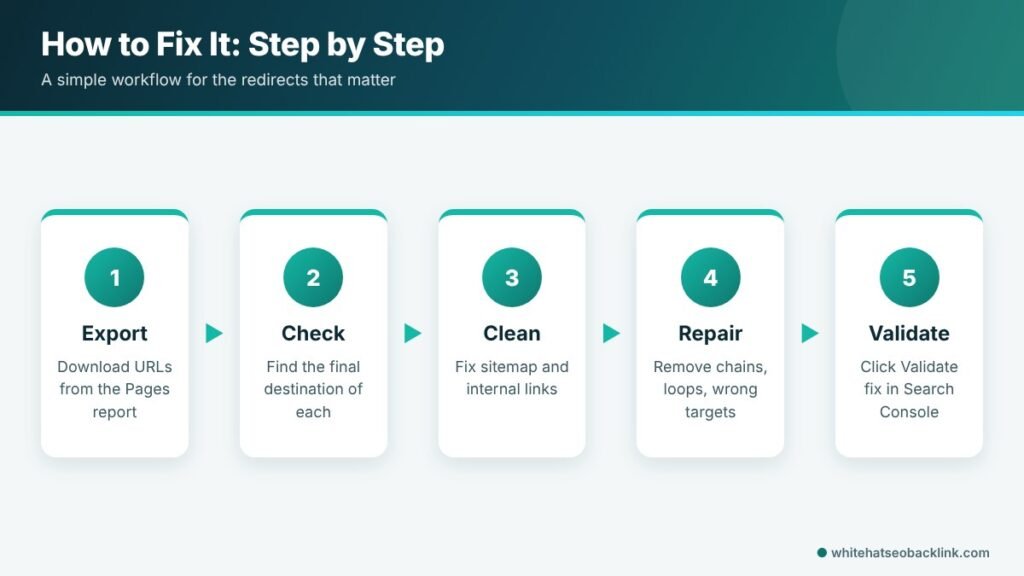
Step 5: Update internal links
Crawl your site and find links that point to redirected URLs. Update them to the final URL. This also helps you catch orphan pages that lost their links during a migration.
Step 6: Fix chains, loops and wrong targets
Point every old URL straight to its final destination with a single 301. Remove redirects on pages that should be live, and fix loops right away.
Step 7: Validate the fix
Back in the Pages report, click “Validate fix”. Google will recheck the URLs over the next few weeks. Remember: harmless redirects will stay in the report, and that is fine.
How to Fix Page With Redirect in WordPress
WordPress sites hit this status often because slugs, categories and plugins change over time. A few quick checks:
- Rank Math or Yoast sitemaps: These usually exclude redirected URLs automatically, but check for old custom post types or tags you no longer use.
- Redirection manager: Open your SEO plugin’s redirect list and look for chains, such as an old redirect pointing to a URL that was later redirected again.
- Permalink changes: If you changed your permalink structure, make sure old URLs redirect to the new ones with a single 301.
- Trashed posts and tags: When you delete content, redirect it to the closest relevant page, not always the homepage.
How Long Does It Take to Clear?
Old redirected URLs can stay in the page with redirect list for months, because Google keeps finding them through old links on other websites. That is not a problem. What matters is that your important pages are indexed and your sitemap, internal links and canonicals point to final URLs.

How to Prevent It in the Future
- Plan URL changes carefully and avoid changing slugs without a reason
- Add redirects at the same time you change a URL
- Update internal links after every migration
- Audit redirects every quarter as part of your technical SEO checklist
- Keep your sitemap limited to indexable, final URLs
Final Thoughts
Page with redirect is usually Search Console’s way of confirming that your redirects work. Do not panic about the number. Instead, check that no important page redirects by mistake, clean your sitemap and internal links, and remove chains. Once that is done, you can safely ignore what remains.
FAQs
Does page with redirect hurt SEO?
Not on its own. It only becomes a problem when important pages redirect by mistake or when chains and loops stop Google from reaching the final page.
Should I remove redirects to clear the report?
No. Removing correct redirects would create 404 errors and lose link value. Keep redirects that send users to the right page.
Why does Google still crawl my old URLs?
Other websites, old sitemaps and bookmarks still link to them. Google rechecks them from time to time.
What is the difference between page with redirect and redirect error?
Page with redirect means the redirect works. A redirect error means Google could not complete it, for example because of a loop or a chain that is too long.
Should redirects be 301 or 302?
Use 301 for permanent moves and 302 only for short, temporary changes.