Duplicate Without User-Selected Canonical: What It Means and How to Fix It
You open Google Search Console, check the Pages report and see a reason you do not recognize: Duplicate without user-selected canonical. Some of your URLs are not indexed, and you are not sure if you should worry.
Good news: duplicate without user-selected canonical is common and usually easy to fix. In this guide you will learn what it means in plain English, when to ignore it, how to find the cause and the exact fixes that work, step by step.
What Does “Duplicate Without User-Selected Canonical” Mean?
It means Google found a page that looks the same as (or very similar to) another page, and you did not tell Google which version is the main one. So Google picked a canonical version itself and left this URL out of the index.
In short: duplicate content, no canonical tag, Google chose for you.
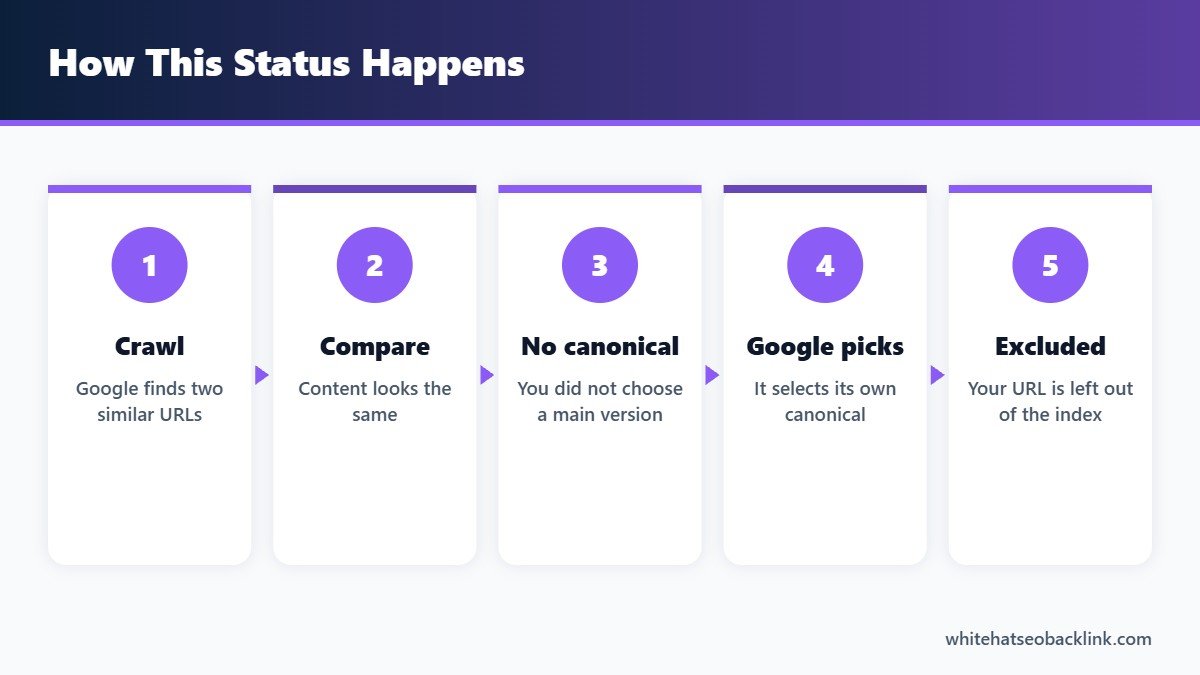
Duplicate Without User-Selected Canonical Meaning: A Simple Example
Imagine an online shop with a product page at /blue-shirt/. Visitors can also reach the same page at /blue-shirt/?size=m and /blue-shirt/?ref=email. All three URLs show the same content, and none of them has a canonical tag.
Google crawls all three, decides /blue-shirt/ is the main one and reports the other two as “duplicate without user-selected canonical”. In this case, the duplicate without user-selected canonical status is harmless, because the right page is indexed. The problem only starts when Google picks the wrong page as the main version.
How It Differs From Similar Search Console Statuses
| Status | What happened | Usually a problem? |
|---|---|---|
| Duplicate without user-selected canonical | No canonical set, Google chose another URL | Sometimes |
| Duplicate, Google chose different canonical than user | You set a canonical, Google ignored it | Often |
| Alternate page with proper canonical tag | You set a canonical and Google followed it | No |
If you see the third status instead, read our guide on Alternate page with proper canonical tag. It is usually a good sign.
Is Duplicate Without User-Selected Canonical Bad for SEO?
Not always. Ask one question: should this URL rank on its own?
- No (filter URLs, tracking parameters, print versions, HTTP copies): this is fine. Google is handling it. You can still add canonicals to make your intent clear.
- Yes (a unique product, service or blog page): this is a problem. Google thinks your important page is a copy of something else, so it will not show in search.

Common Causes of Duplicate Without User-Selected Canonical
- URL parameters:
?color=red,?sort=price,?utm_source=create many versions of one page. - HTTP vs HTTPS or www vs non-www: both versions are reachable.
- Trailing slash differences:
/pageand/page/both load. - Thin or near-identical pages: location pages that only swap the city name, or product variants with the same description.
- WordPress archives: tag, category, author and date archives that repeat the same posts.
- Pagination and print pages without clear signals.
- Missing canonical tags from your theme or SEO plugin.
How to Fix “Duplicate Without User-Selected Canonical”: Step-by-Step
Step 1: Export the Affected URLs
In Google Search Console, go to Indexing, then Pages, and click the “Duplicate without user-selected canonical” reason. Export the list and sort URLs into “should be indexed” and “should not be indexed”.
Step 2: Inspect Important URLs
Paste each important URL into the URL Inspection tool. Look at “Google-selected canonical”. This shows which page Google thinks is the original. That tells you exactly what Google sees as the duplicate.
Step 3: Add Self-Referencing Canonical Tags
Every indexable page should have a canonical tag pointing to itself. In WordPress, Rank Math and Yoast add these automatically. Check the page source for <link rel="canonical" href="...">. If it is missing, check your SEO plugin settings or theme.
Step 4: Point Duplicates to the Main Version
For true duplicates (parameter URLs, variants, copies), add a canonical tag pointing to the main page. Use the full absolute URL with the correct protocol and trailing slash.
Step 5: Redirect Duplicates That Should Not Exist
HTTP, non-www and old URLs should 301 redirect to the preferred version. A redirect is a stronger signal than a canonical tag. Keep redirects direct and avoid chains. See how to fix redirect chains.
Step 6: Make Important Pages Truly Unique
If Google picked another page as canonical for a page you want ranked, the content is probably too similar. Rewrite it with unique details: specific services, local information, FAQs, photos, prices or examples. This is the real fix for thin location and product pages.

Step 7: Send Consistent Signals
- Link internally to the canonical version only.
- Include only canonical URLs in your XML sitemap.
- Use the same URL format everywhere (HTTPS, www or not, trailing slash or not).
- Noindex thin WordPress archives that add no value (tag or date archives on small blogs).
Step 8: Validate the Fix
Back in Search Console, click “Validate fix” on the issue. Google will recrawl the URLs over the next days or weeks. Request indexing for your most important pages using URL Inspection.

WordPress Tips to Prevent Duplicate Without User-Selected Canonical
- In Rank Math, check Titles & Meta settings for archives and set thin ones to noindex.
- Make sure your site address in Settings, General uses your preferred version (HTTPS and www or non-www).
- Avoid publishing the same content in multiple categories with separate URLs.
- If you run WooCommerce, keep variation descriptions unique or canonicalize variations to the parent product. Our ecommerce technical SEO guide covers this in depth.
How Long Does It Take to Fix Duplicate Without User-Selected Canonical?
Small sites often see changes within a few weeks. Large sites can take longer because Google needs to recrawl many URLs. Check progress weekly in the Pages report.
Related Indexing Problems to Check
Duplicate issues often appear alongside other indexing problems. If you also see these, read our guides:
Frequently Asked Questions
Should I fix every duplicate without user-selected canonical URL?
No. Only fix URLs that should rank. Parameter and filter URLs being excluded is normal and expected.
Is a canonical tag a directive?
No. Google treats canonical tags as strong hints, not rules. That is why consistent signals (redirects, internal links and sitemaps) matter.
Can duplicate content cause a Google penalty?
Normal duplicate content does not cause a manual penalty. The real risk is that Google ranks the wrong version or splits signals between copies.
Final Thoughts
“Duplicate without user-selected canonical” is Google asking you to pick a favorite. Add self-referencing canonicals, point duplicates to the main version, redirect copies that should not exist and make important pages unique. Keep your signals consistent and the problem goes away.
Want a full review of your site’s indexing? Start with our technical SEO checklist or ask our team for a technical SEO audit.