Alternate Page With Proper Canonical Tag: What It Means and How to Fix It
You open Google Search Console, click into the Pages report and see a long list of URLs under “Alternate page with proper canonical tag.” It sits right under the heading “Why pages aren’t indexed,” so it’s natural to assume something is broken.
In most cases, nothing is. This status usually means Google is doing exactly what you asked it to do. But sometimes it hides a real problem, like an important page that Google thinks is a copy of something else.
This guide explains what the status means, when you can safely ignore it, when you should act, and how to fix it step by step.
What Does “Alternate Page With Proper Canonical Tag” Mean?
It means Google found a page that points to a different URL as its canonical (main) version, and Google agrees with that choice. So Google indexes the canonical URL and leaves the alternate one out of search results.
A quick refresher: a canonical tag is a line of code in a page’s <head> that tells search engines which version of a page is the main one. It looks like this:
<link rel="canonical" href="https://example.com/blue-shoes/" />
If page B carries a canonical tag pointing to page A, and Google accepts it, page B shows up in Search Console as “Alternate page with proper canonical tag.” Page A is the one that gets indexed and ranked.

The word “proper” matters. It tells you the canonical tag is set up correctly and Google is following it. That’s why Google itself treats this as an informational status rather than an error.
Why You See This Status
These are the most common reasons a page ends up in this report:
- URL parameters. Tracking codes like
?utm_source=facebook, filter options like?color=redor sort options like?sort=pricecreate new URLs that point back to the clean version. - Mobile or AMP versions. Separate mobile URLs (m.example.com) or AMP pages usually point to the main desktop page.
- Pagination and archives. Some sites canonicalize paginated pages to the first page, though this isn’t always a good idea.
- HTTP vs HTTPS and www vs non-www. If several versions of your site load, the canonical tag tells Google which one is the real one.
- Product variants. Ecommerce sites often have one product with several color or size URLs that all point to a main product page.
- Duplicate or syndicated content. Content republished on another URL may point back to the original.
When Is It Okay to Ignore?
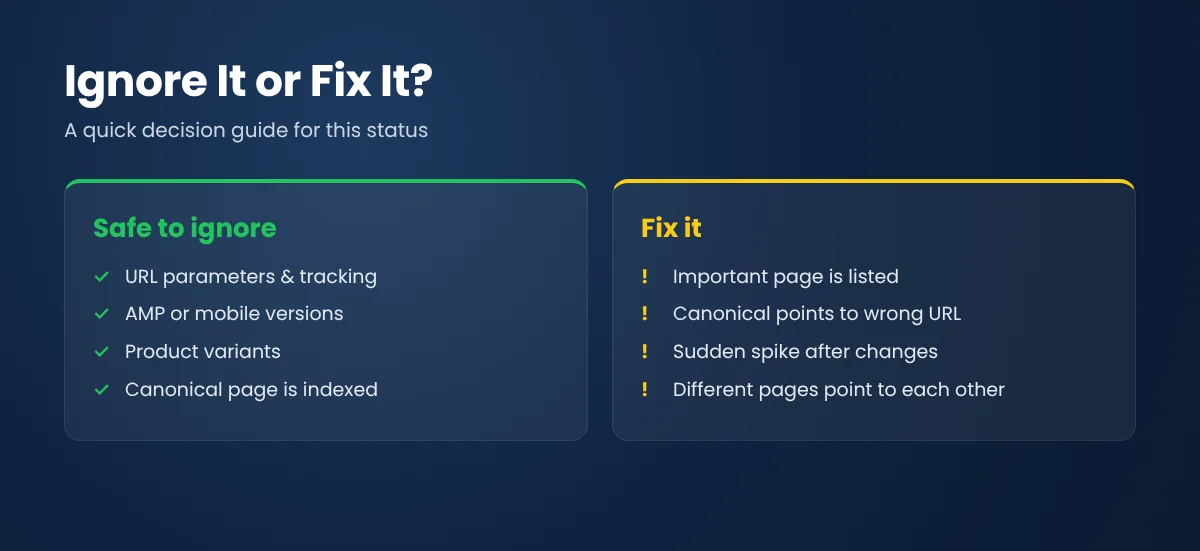
You can usually leave it alone if:
- The URLs listed are variations you don’t want ranking (parameters, AMP, print versions, variants).
- The canonical URL they point to is indexed and working.
- Your important pages are not on the list.
If all three are true, the report is simply confirming that your canonical setup works. You don’t need to “fix” anything, and trying to force these URLs into the index can create duplicate content problems.
When You Should Take Action
Look closer if any of these apply:
- A page you want to rank is on the list. For example, a service page or a blog post that should appear in Google on its own.
- The canonical points to the wrong URL. Maybe a plugin or theme is pointing pages to the homepage or to an unrelated page.
- The number suddenly jumped. A big spike after a redesign, plugin change or migration often signals a misconfiguration.
- Two genuinely different pages point to each other. If the pages aren’t real duplicates, they each need their own self-referencing canonical.
How to Fix “Alternate Page With Proper Canonical Tag” Step by Step
Here’s the process we use when this status needs attention.
Step 1: Export the list and sort it
In Search Console, go to Indexing > Pages, click “Alternate page with proper canonical tag,” and export the URLs. Sort them into two groups: URLs you expect to be alternates (parameters, variants, AMP) and URLs that surprise you.
Step 2: Inspect the surprising URLs
Use the URL Inspection tool for each unexpected page. Look at two fields: “User-declared canonical” and “Google-selected canonical.” This tells you what your site is telling Google and what Google decided.
Step 3: Check the canonical tag on the page
Open the page, view the source and search for rel="canonical". If a page you want indexed points somewhere else, that’s your fix. On WordPress, the canonical is usually set by your SEO plugin, such as Rank Math or Yoast, and you can change it in the post’s advanced SEO settings.
Step 4: Set a self-referencing canonical on important pages
Every page you want to rank should point to itself. For example, https://example.com/services/ should carry a canonical tag of https://example.com/services/. This is the single most important fix.
Step 5: Clean up internal links and your sitemap
Google looks at more than the canonical tag. If your menus, internal links and XML sitemap point to the alternate URL, Google gets mixed signals. Make sure all of them use the canonical version, and remove alternate URLs from your sitemap.

Step 6: Request indexing and wait
After fixing a page, go back to the URL Inspection tool and click Request Indexing. Then give Google time. Changes can take a few days to a few weeks to show up in the report.
Common Canonical Mistakes to Avoid
- Pointing every page to the homepage. This tells Google your whole site is one page.
- Canonicalizing paginated pages to page one. Page 2, 3 and so on contain different content. Usually they should each self-canonicalize.
- Using relative URLs. Always use the full URL, including https://.
- Sending mixed signals. A canonical tag that says one thing while redirects, hreflang or sitemaps say another confuses Google.
- Adding noindex and canonical together. Pick one approach for each page.
Alternate Page vs Similar Statuses
This status is easy to confuse with others in the same report:
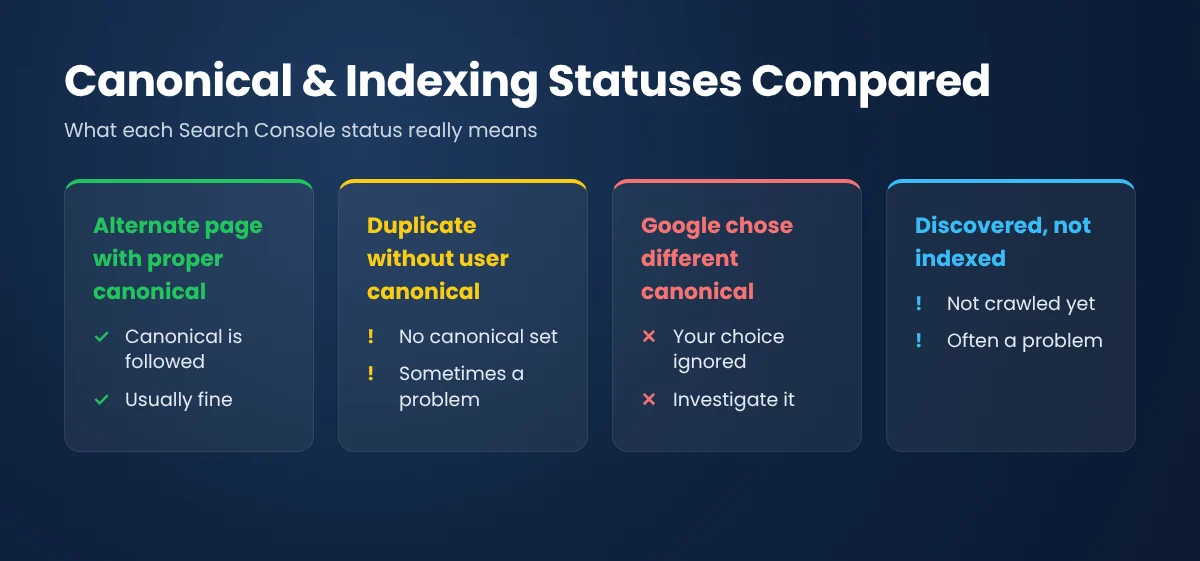
| Status | What it means | Usually a problem? |
|---|---|---|
| Alternate page with proper canonical tag | Your canonical is followed correctly | No |
| Duplicate without user-selected canonical | Google found duplicates and you didn’t set a canonical | Sometimes |
| Duplicate, Google chose different canonical than user | Google ignored your canonical choice | Yes, investigate |
| Discovered – currently not indexed | Google knows the URL but hasn’t crawled it | Often |
If you’re also seeing pages stuck in discovery, our guide on Discovered – Currently Not Indexed covers that issue in detail.
Frequently Asked Questions
Is “alternate page with proper canonical tag” an error?
No. It’s an informational status. It means Google found a page that points to another URL as its main version and Google agreed. It only needs attention if important pages are on the list.
Will this hurt my rankings?
Not by itself. The canonical page still gets indexed and ranked. It can only hurt if a page you actually want ranking is being treated as an alternate.
How do I remove pages from this report?
You don’t need to remove them if they’re true alternates. If a page shouldn’t be there, give it a self-referencing canonical, update internal links and your sitemap, then request indexing.
How long does it take Google to update the status?
Usually a few days to a few weeks after Google recrawls the page. Larger sites may take longer.
Final Thoughts
“Alternate page with proper canonical tag” sounds alarming, but most of the time it’s Google telling you your setup works. Focus your attention on the few URLs that matter: important pages wrongly treated as duplicates, and canonical tags pointing to the wrong place.
For a broader health check of your site, run through our technical SEO checklist. And once your pages are indexed properly, strong backlinks help them climb. Our white-hat link building services can help with that part.