
Content Audit: How to Do One in 9 Steps (With Template)
Most websites don’t have a content problem. They have a content pile. Years of blog posts, landing pages and old announcements sit side by side, and nobody knows which ones still earn traffic, which ones quietly compete with each other, and which ones should have been retired two redesigns ago. A content audit fixes that. It gives every URL on your site a clear verdict, so you spend your time on the pages that can actually move rankings, leads and AI visibility.
This guide walks you through the exact 9-step content audit process we use on client sites, plus a quality scorecard, a template you can copy into a spreadsheet, and a section on auditing for AI search that most guides skip.
Key takeaways
- A content audit gives every URL on your site one clear verdict: keep, update, merge, redirect or remove.
- Combine a site crawl, your sitemap and Search Console so your inventory misses nothing.
- Score each page from 0 to 10 so your content audit decisions stay consistent across the team.
- Fix quick wins first (pages in positions 4 to 15) and measure results after 4 to 8 weeks.
- Repeat the content audit on a schedule so content decay never piles up again.
What is a content audit?
A content audit is a structured review of the content on your website. You list every page, attach performance and quality data to it, and decide what should happen next: keep it, update it, merge it, redirect it or remove it.
People often mix up a content audit with a content inventory. They are related, but they are not the same job:
|
Content inventory |
Content audit |
|
|---|---|---|
|
Question it answers |
What do we have? |
Is it any good, and what should we do with it? |
|
Output |
A list of URLs and basic details |
A decision and a priority for every URL |
|
Type of work |
Mostly automated (crawl and export) |
Data analysis plus human judgment |
|
When it happens |
First |
Second, using the inventory |
In short, the inventory is the raw list. The audit is the thinking you do on top of it.
Why a content audit matters more in 2026
Publishing more is no longer a safe default. Google evaluates the helpfulness of your site as a whole, AI answer engines pull from a small number of trusted pages, and crawlers have limited time to spend on each domain. Weak pages drag all three down. A regular SEO content audit helps you:
Recover lost traffic
Pages that slipped from page one often need a refresh, not a rewrite.
Use crawl budget better
Bots spend their time on pages that matter instead of dead ends.
Stop pages competing with each other
Two posts on the same query usually means neither ranks well.
Get cited by AI tools
Clear, current, well-structured pages are easier for AI Overviews and chat assistants to quote.
Raise overall site quality
Fewer thin or outdated pages means a stronger quality signal across the domain.
Find your next topics
The audit shows the gaps your current content does not cover.
When should you run a content audit?
Some moments make an audit urgent: a traffic drop after a core update, a site migration or redesign, a rebrand, a change in what you sell, or the point where your team can no longer say what the blog actually covers. Outside of those triggers, a steady schedule works best. Here is a practical rhythm based on site size:
|
Site size |
Full audit |
Light check |
|---|---|---|
|
Under 100 pages |
Once a year |
Top 20 pages every quarter |
|
100 to 1,000 pages |
Every 6 to 12 months |
One section per month |
|
Over 1,000 pages |
Rolling, by section |
Automated alerts for traffic drops |
Treat these as starting points, not rules. A news site with fast-changing facts needs more frequent checks than a site full of evergreen tutorials.
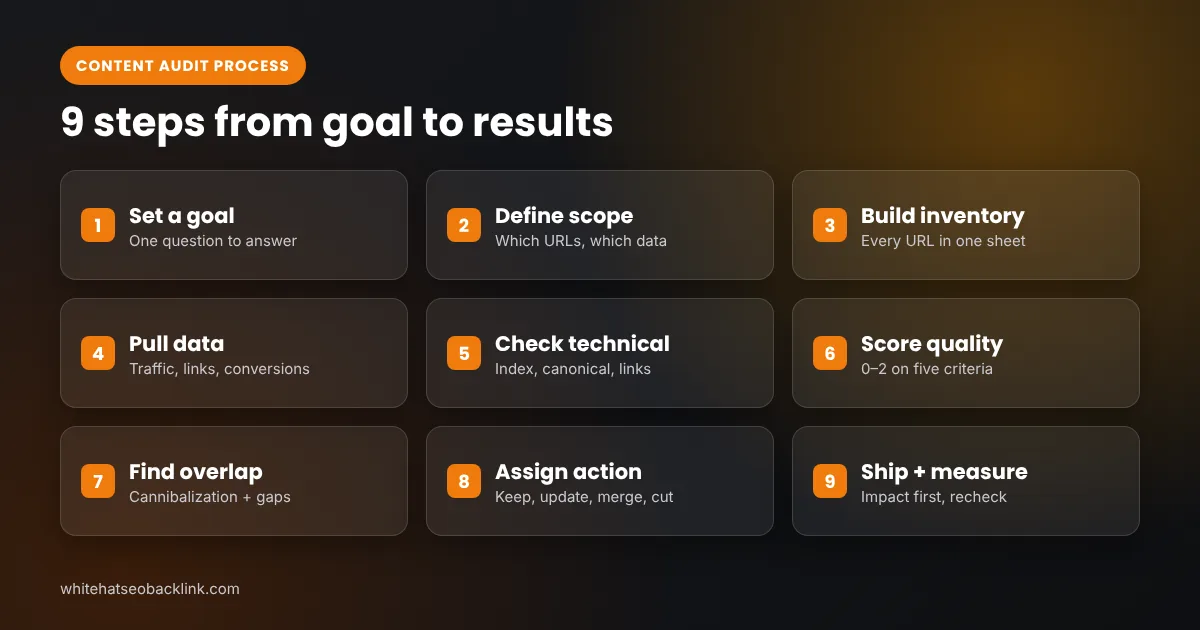
How to do a content audit in 9 steps
Each step feeds the next, so work through them in order. On a small site you can finish the whole process in a few days. On a large site, run it one section at a time.
Step 1: Set one clear goal
An audit without a goal turns into a spreadsheet nobody reads. Pick the one question you want answered, because it decides which data you collect. A few examples:
- Why did organic traffic fall 30% since spring?
- Which blog posts should we update first to drive more demo requests?
- Which pages can we safely drop before the site migration?
Step 2: Define the scope
Decide which part of the site you are auditing and over what time period. “All blog posts, last 12 months of data” is a clean scope. “Everything” usually is not. Leave out pages that serve a fixed purpose, such as legal pages, login screens and checkout steps, unless they are part of your goal.
Step 3: Build your content inventory
Get every URL in scope into one spreadsheet. Combine at least two sources, because each one misses something:
- Your XML sitemap or CMS export (what you think is live)
- A site crawl with a tool like Screaming Frog or Ahrefs Site Audit (what bots can actually reach)
- Pages report from Google Search Console (what Google knows about)
URLs that appear in one source but not the others are your first findings. A page in Search Console but not in your sitemap may be an old URL that still gets traffic. A page in your sitemap that the crawler never found is likely an orphan page with no internal links.
Step 4: Pull performance data
Add the numbers that match your goal. For most SEO content audits, that means:
- Clicks and impressions from Search Console, ideally comparing two periods so you can see the trend
- Main query and average position for each URL
- Sessions and conversions from GA4 (sign-ups, leads, sales)
- Referring domains from Ahrefs or a similar tool
- Publish date and last updated date from your CMS
Tip: look at the trend, not just the total. A page with modest traffic that has doubled in six months deserves very different treatment from one that has fallen by half.
Step 5: Check technical health
A great article can’t rank if Google can’t index it. Before you judge the writing, confirm each page is technically eligible to perform. Flag any URL that is:
- Not indexed, for example “Crawled, currently not indexed” in Search Console
- Canonicalized to another URL, or set to noindex by mistake
- Returning a redirect, a 404 or a soft 404
- Receiving few or no internal links
- Slow on mobile or failing Core Web Vitals
Fix these issues separately from the content decisions. Our technical SEO checklist covers each one in detail.
Step 6: Score content quality
Numbers tell you what is happening. Reading the page tells you why. To keep this step fast and consistent, score every page from 0 to 2 on five criteria, for a total out of 10:
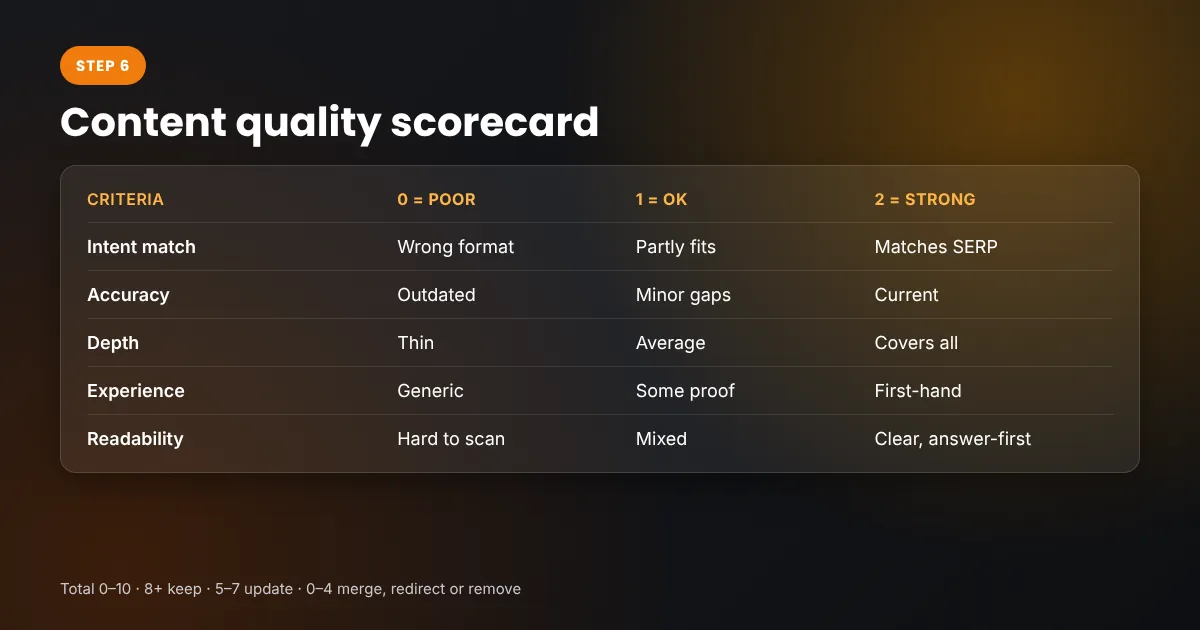
- Intent match: Does the format match what currently ranks? A listicle will struggle on a query where Google shows tools or product pages.
- Accuracy: Are the facts, screenshots, prices and dates still correct?
- Depth: Does it answer the main question and the obvious follow-up questions?
- Experience: Does it show first-hand knowledge, real examples or original data, or could anyone have written it?
- Readability: Does it answer early, use clear headings and stay easy to scan on a phone?
As a rule of thumb, 8 or more means keep, 5 to 7 means update, and 4 or less means the page is a candidate to merge, redirect or remove. The score is a starting point; your traffic and backlink data still have the final say.
Step 7: Find overlap and gaps
Sort your sheet by main query. When two or more URLs target the same query, you have a keyword cannibalization problem, and one of them usually needs to be merged into the other or refocused on a different intent.
Then flip the question: what should your site cover that it doesn’t yet? Compare your pages with the top competitors in your niche using a content gap analysis, and group the missing topics into topic clusters so new posts strengthen the pages you already have.
Step 8: Assign an action to every URL
Now every page gets exactly one verdict. If a URL ends the audit without a decision, the audit isn’t done.
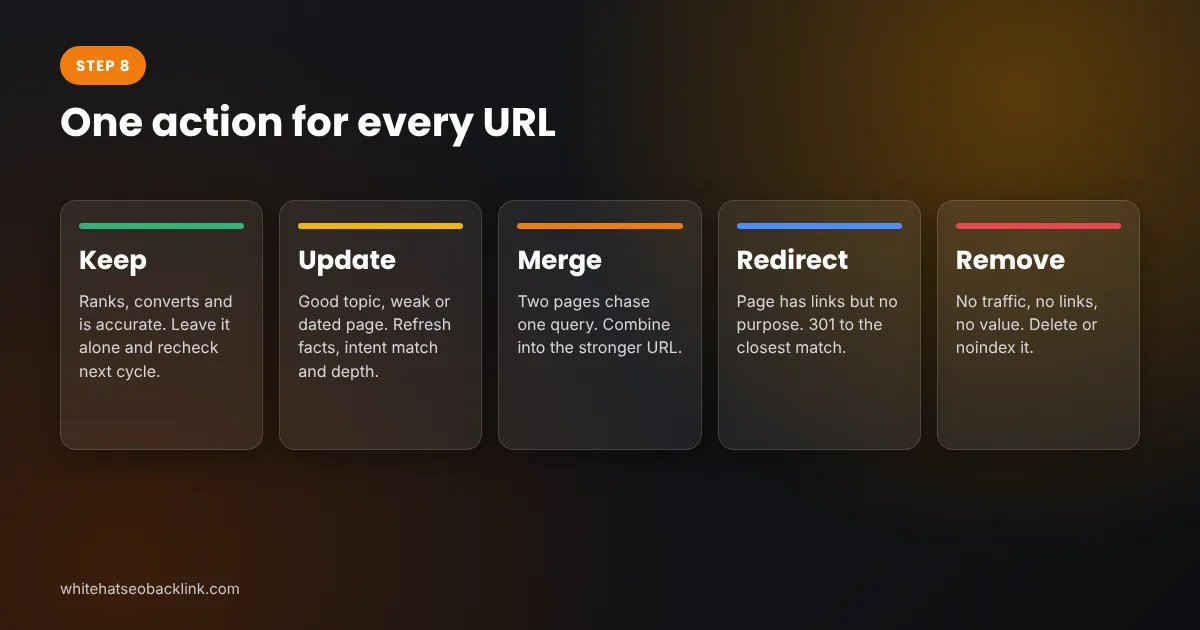
- Keep: The page ranks, converts and is accurate. Leave it alone.
- Update: The topic is worth it, but the page is dated, thin or misses the intent.
- Merge: Two or more pages cover the same ground. Combine them into the stronger URL and redirect the rest.
- Redirect: The page has backlinks or traffic but no ongoing purpose. Send it to the closest relevant page with a 301.
- Remove: No traffic, no links, no business value. Delete it (410 or 404) or noindex it if users still need it.
Merging and removing pages carries more risk than updating them, so be careful with pages that have backlinks. We cover the safe way to do it, including redirect rules and how to merge without losing rankings, in our guide to content pruning.
Step 9: Prioritize, ship and measure
You won’t fix 300 pages in a week, and you don’t need to. Rank your action list by likely impact against effort, then start at the top:
- Quick wins: Pages ranking in positions 4 to 15 that only need a refresh, a better title or stronger internal links.
- Money pages: Posts close to a conversion (comparisons, service-related guides) with falling traffic.
- Merges: Cannibalizing pairs where combining them should lift one URL.
- Cleanup: Redirects and removals for pages with no value.
Log the date of every change in your sheet. Check results after 4 to 8 weeks, because Google needs time to recrawl and reassess updated pages. Compare clicks, average position and conversions with the same period before the change.
Content audit template: the columns you need
You don’t need fancy software. A spreadsheet with these columns covers almost every content audit. Copy them into Google Sheets or Excel and add one row per URL:
|
Column |
What goes in it |
Source |
|---|---|---|
|
URL |
Full page address |
Crawl / sitemap |
|
Title and content type |
Blog post, service page, guide, etc. |
CMS |
|
Main query |
The query with the most clicks |
Search Console |
|
Clicks (now vs before) |
Two periods side by side |
Search Console |
|
Average position |
For the main query |
Search Console |
|
Conversions |
Leads, sign-ups or sales |
GA4 |
|
Referring domains |
Unique sites linking to the page |
Ahrefs or similar |
|
Index status |
Indexed, excluded, canonicalized |
Search Console |
|
Last updated |
Date of the last real edit |
CMS |
|
Quality score (0–10) |
Your five-criteria score |
Manual review |
|
Action |
Keep, update, merge, redirect, remove |
Your decision |
|
Priority and owner |
High / medium / low, plus who does it |
Your decision |
|
Notes and date done |
What changed and when |
Your team |
When an update needs a deeper rewrite, turn the notes column into a proper content brief so the writer knows exactly what to fix.
How to audit content for AI search visibility
Classic audits stop at Google rankings. In 2026, that leaves a blind spot. AI Overviews, ChatGPT and Perplexity answer many questions directly, and they lean on pages that are easy to extract facts from. Add these checks to your audit for your most important pages:
- Answer-first structure: Does each key section open with a direct, one- or two-sentence answer before going deeper?
- Clear entities: Are your brand, products, people and topics named consistently, so a machine can tell what the page is about?
- Something original: Does the page include data, examples or opinions that only you can provide? Pages that repeat what everyone else says rarely get cited.
- Freshness signals: Is the “last updated” date accurate, and do the facts match it?
- Structured data: Is the right schema (Article, FAQ, HowTo, Product) in place where it truly fits?
- Current visibility: Ask the main AI tools your top questions and note whether your site is mentioned or cited.
If you want to go further, our guide on how to show up in AI Overviews explains what these systems look for.
Content audit tools worth using
You can run a solid audit with free tools alone. Paid tools mainly save time on larger sites.
|
Tool |
Free or paid |
Best for |
|---|---|---|
|
Google Search Console |
Free |
Clicks, queries, positions and index status |
|
Google Analytics 4 |
Free |
Engagement and conversions per page |
|
Screaming Frog SEO Spider |
Free up to 500 URLs, then paid |
Crawling, status codes, titles, word count |
|
Ahrefs |
Paid |
Backlinks, keyword rankings and content gaps |
|
Semrush |
Paid |
Content audit reports and position tracking |
|
Google Sheets or Excel |
Free |
Combining data and tracking decisions |
AI assistants are useful for summarizing pages or drafting update notes at scale. Just don’t let them make the final keep-or-remove call. They can’t see your business goals, and they can misread your data.
Content audit example: a small agency blog
Here is how the process plays out on a typical example: a service business blog with 120 posts and flat traffic for a year. (The numbers are illustrative, to show how decisions are made.)
- Goal: Grow leads from organic search.
- Inventory finding: 9 posts were missing from the sitemap and had zero internal links.
- Overlap: Three posts targeted the same “how to” query. They were merged into one updated guide.
- Verdicts: 45 keep, 38 update, 12 merge, 15 redirect, 10 remove.
- First sprint: The 15 posts sitting in positions 5 to 15 were refreshed first, because they were closest to page-one gains.
The lesson: most of the value came from updating and consolidating existing posts, not from writing new ones.
Common content audit mistakes
- Deleting by traffic alone. A low-traffic page can still have strong backlinks, support sales or rank for valuable long-tail terms.
- Judging too early. New pages often need 6 to 12 months before their traffic is a fair signal.
- Changing the date without changing the content. A new “updated” date on an unchanged page misleads readers and earns nothing.
- Collecting data without deciding. If the sheet has no action column filled in, you have an inventory, not an audit.
- Not tracking changes. Without dates in your log, you can’t tell which updates worked.
- Treating it as one-off. Content decays. A light check every quarter prevents the next big cleanup.
Content audit FAQs
Final thoughts
A content audit isn’t glamorous, but it is one of the highest-return jobs in SEO. You already paid to create those pages; the audit makes sure each one earns its place. Start with one clear goal, give every URL a verdict, ship the quick wins first and repeat the process on a schedule. If you’d rather hand it to a team that does this every week, get in touch and we’ll take a look at your site.
Want a content audit done for you?
Our team reviews every URL, scores it, and hands you a prioritized action list your writers can start on right away.