How to Disavow Backlinks: When to Do It, When to Skip It and the Exact Steps
You open your backlink report and see hundreds of strange links: casino pages, auto-generated directories, sites in languages you don’t speak. The first instinct is to disavow all of it, today.
Slow down. How to Disavow Backlinks tool is powerful, and using it the wrong way can remove links that were actually helping you. In this guide you’ll learn when disavowing makes sense, how to find the links that really are a problem, and how to build and upload a disavow file step by step.
What does it mean to disavow backlinks?
Disavowing is asking Google to ignore specific links when it assesses your site. You do it by uploading a plain text file listing the pages or domains you don’t want counted, through the disavow links tool in Google Search Console.
It doesn’t remove the links from the web. They stay where they are. Google just stops treating them as a vote for your site.
Do you even need to disavow?
For most websites, the answer is no. Google has said many times that its systems are good at ignoring spammy links on their own. Random low-quality links pointing at you are normal on the web and usually do nothing.
Google’s own disavow help page says you should only consider it if you have a large number of spammy, artificial or low-quality links and those links have caused, or are likely to cause, a manual action.

Disavow when:
- You have a manual action for “unnatural links to your site” in Search Console.
- You (or a previous SEO agency) bought or built spammy links: private blog networks, link farms, mass directory submissions, paid links without nofollow or sponsored attributes.
- You see a clear pattern of manipulative links with exact-match anchors that you can’t get removed.
Skip it when:
- The links are just random spam scrapers and odd directories you never asked for.
- A tool marked links as “toxic” but your rankings and traffic are stable.
- You simply want to “clean up” your profile with no real problem.
If you didn’t build the bad links and you don’t have a manual action, the safest move is usually to do nothing.
Step 1: Check for a manual action first
In Google Search Console go to Security & Manual Actions > Manual actions. If it says “No issues detected”, you don’t have a link penalty from a human reviewer.
If you do see an “Unnatural links to your site” action, Google will usually describe the problem. That’s your main reason to clean up and disavow, then file a reconsideration request.
Step 2: Export all your backlinks
Pull your links from more than one source so you don’t miss anything:
- Google Search Console: Links > Top linking sites > Export.
- A backlink tool: Ahrefs, Semrush or Moz. Export referring domains and backlinks with anchor text.
Combine them in one spreadsheet and remove duplicates by domain. Working at the domain level makes the job much faster.
Step 3: Find the links that are actually harmful
This is where most people go wrong. “Toxic score” numbers from tools are only a starting point. Open the linking pages and judge them yourself. Red flags include:
| Red flag | What it looks like |
|---|---|
| Link networks (PBNs) | Many sites with the same design, thin posts and links to unrelated businesses |
| Paid links without attributes | “Sponsored post” pages with dofollow links and no rel=”sponsored” |
| Exact-match anchor spam | Dozens of links all using your money keyword |
| Hacked or injected links | Your link hidden in pages about unrelated topics, often in another language |
| Mass directories and comment spam | Hundreds of profile, forum or comment links you or an old agency created |
Links that are just low authority but real (a small local blog, a niche forum post) are usually fine. Low authority does not mean toxic. Our guide on anchor text diversity helps you spot unnatural anchor patterns.
Step 4: Try to remove the worst links first
If you have a manual action, Google wants to see real effort. Contact site owners and ask for removal of links you or your agency created. Keep a simple log: domain, contact date, response.
Many won’t reply, and that’s fine. Anything you can’t remove goes into your disavow file.
Step 5: Create your disavow file
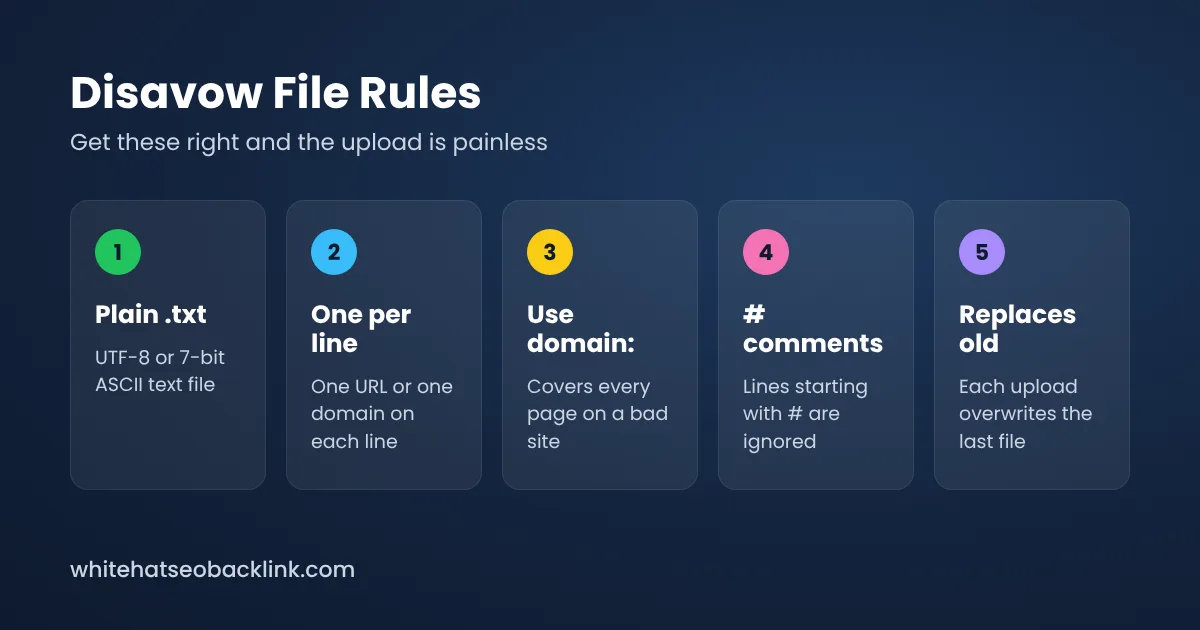
The file is a plain text file (.txt) encoded in UTF-8 or 7-bit ASCII. Each line is one URL or one domain. Lines starting with # are comments and are ignored.
Here’s an example:
# Paid links from old campaign, removal requested, no reply
domain:spammy-link-network.com
domain:cheap-directory-list.net
https://example-blog.com/random-post-with-paid-link/
A few rules that save headaches:
- Use domain: for most bad sites. It covers every page on that domain, including future ones.
- Use a full URL only when the site is fine overall but one page is a problem.
- Don’t include your own domain or any links you want to keep.
- Google’s limits are a 2MB file size and 100,000 lines, which is plenty for almost every site.
Step 6: Upload it to Google Search Console
- Open the disavow links tool.
- Pick your property. The tool has historically worked with URL-prefix properties, so add one if you only see a Domain property.
- Click Upload disavow list and choose your .txt file.
- Check for errors and fix any lines Google flags.
Important: each new upload replaces the old file. If you want to add domains later, download your current list, add the new lines, and upload the full file again.
Step 7: Request reconsideration (only if you have a manual action)
If you’re fixing a manual action, go back to the Manual actions report and submit a reconsideration request. Explain what happened, what you removed, what you disavowed and how you’ll avoid it in future. Be honest and specific.
Without a manual action there is nothing to request. Google simply processes the file as it recrawls the web.
How long does a disavow take to work?
There’s no switch that flips overnight. Google applies the file as it recrawls the pages linking to you, which can take weeks or months. Don’t keep changing the file every few days. Upload a careful version and give it time.
Also note that Google has said publicly the disavow tool may be removed at some point in the future. At the time of writing it is still available, but it’s another reason to treat it as a fix for real problems, not a routine task.
Common disavow mistakes
- Disavowing good links because a tool gave them a high toxic score.
- Disavowing everything with low authority, including real small blogs that help you.
- Uploading a new file that drops old entries by accident.
- Using it instead of fixing the cause. If you keep buying spam links, disavowing is just cleanup on repeat.
Prevention beats cleanup
The easiest disavow file is the one you never need. Build links from relevant, real websites with real traffic, keep anchors natural and avoid packages that promise hundreds of links for a low price. Our guest post site quality checklist and white-hat backlink methods show how.
Final thoughts
Knowing how to disavow backlinks is useful, but knowing when not to is even more important. Check for a manual action, judge links by hand, remove what you can, and disavow only clear manipulation, mostly at the domain level.
Not sure whether your profile has a real problem? Request a free link analysis and we’ll tell you honestly if a disavow is needed, or if your time is better spent building good links with our link building packages.
Frequently asked questions
Can disavowing backlinks hurt my rankings?
Yes, if you disavow links that were helping you. Google will stop counting them, and rankings that depended on them can drop. That’s why you should only disavow links that are clearly manipulative.
Should I disavow toxic backlinks found by SEO tools?
Not automatically. Toxic scores are estimates. Review the links yourself and only disavow those that are part of a link scheme, especially if you or someone you hired created them.
How do I undo a disavow?
Download your current file, remove the lines you no longer want, and upload the new file. To cancel everything, remove the file in the tool. Recovery takes time because Google must recrawl those links.
Do I need a separate file for www and non-www?
The file applies to the property you upload it to. If you have separate URL-prefix properties for different versions of your site, make sure the relevant one has the correct file.