What Is llms.txt? How to Create One and Does It Help SEO?
AI tools like ChatGPT, Claude, Perplexity and Google’s AI features now read the web to answer questions. That raises a new question for site owners: can you tell these tools which pages matter most? That is the idea behind llms.txt.
In this guide you will learn what an llms.txt file is, how it differs from robots.txt, what the evidence says about its value, and how to create one for a WordPress site in about ten minutes. We will also be honest about its limits, which most guides skip.
What is llms.txt?
An llms.txt file is a plain Markdown file that sits at the root of your website, for example yourdomain.com/llms.txt. It gives large language models (LLMs) a short, clean map of your most useful content.
The idea was proposed in September 2024 by Jeremy Howard of Answer.AI. His point was simple: web pages are full of menus, ads, scripts and pop-ups. An AI model with a limited context window struggles to find the useful parts. A short Markdown summary with links solves that.
Think of it as a curated reading list for AI, written by you.
llms.txt vs robots.txt vs sitemap.xml
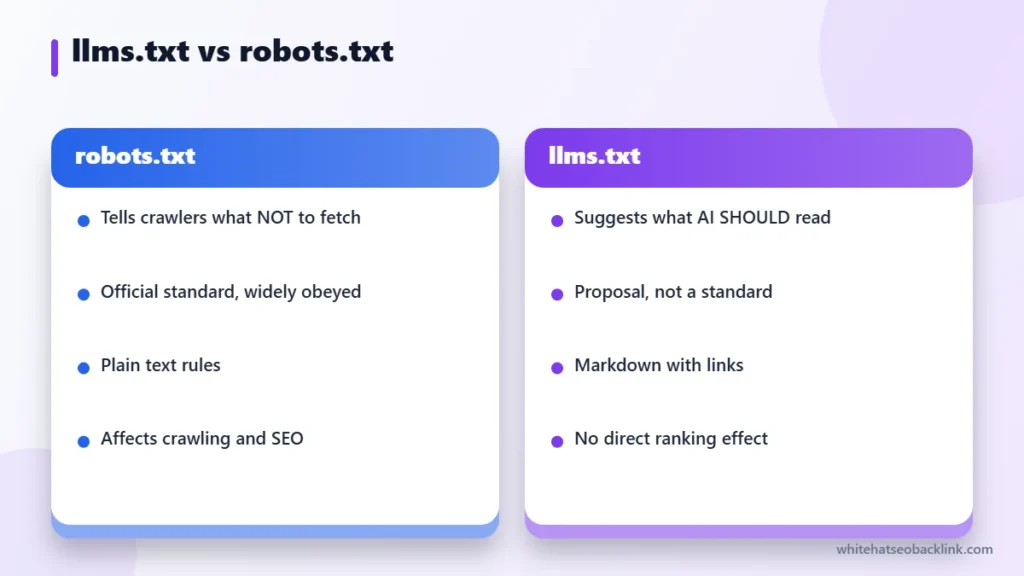
People often confuse these three files. They do very different jobs.
| File | Who reads it | What it does | Official standard? |
|---|---|---|---|
| robots.txt | Search and AI crawlers | Says which paths bots may not crawl | Yes |
| sitemap.xml | Search engines | Lists every URL you want indexed | Yes |
| llms.txt | AI tools and agents | Points to your best content with context | No, a proposal |
The key difference: robots.txt is about access, a sitemap is about discovery, and the new file is about understanding. It does not block anything and it does not replace your sitemap.
Does llms.txt help SEO or AI rankings?
Here is the honest answer: there is no proof that the file improves rankings in Google or visibility in AI answers today.
- Google has said publicly that it does not use the file for Search or AI Overviews. Google staff have compared it to the old keywords meta tag.
- Server log studies have found that most major AI crawlers rarely request the file.
- Some AI companies and developer tools do use it, mainly for documentation sites, so coding assistants can read docs quickly.
So why bother? Because it is cheap, harmless and forward-looking. It takes minutes to set up, it does not affect your normal SEO, and if AI agents start using it widely, you are ready. Just do not expect traffic from it, and do not let it distract you from the work that really matters.

What should go in an llms.txt file?
The proposed format is simple Markdown. In order, it contains:

- An H1 heading with the name of your site or project. This is the only required part.
- A blockquote with a one or two sentence summary of what you do.
- Optional notes in plain paragraphs, such as who your content is for.
- H2 sections that group your links, such as Guides, Services or Docs.
- Links in a list, each with a short note explaining what the page covers.
- An “Optional” section for pages that are useful but can be skipped if the AI is short on space.
llms.txt example for a small business site
Here is a short example for an SEO agency blog. Copy the structure, then swap in your own pages.
# White Hat SEO Backlink

> Guides and services for safe, white hat link building and SEO for small businesses and agencies.

## Guides
- [Broken link building](https://example.com/broken-link-building/): step-by-step method to earn links by fixing dead links
- [Technical SEO checklist](https://example.com/technical-seo-checklist/): 20 checks to help Google crawl and index a site

## Services
- [Guest post service](https://example.com/guest-posts/): how our manual outreach works and what it costs

## Optional
- [About us](https://example.com/about/): team and editorial policy
Keep each description under about 20 words. Write them for a reader who has never seen your site.
What is llms-full.txt?
Some sites also publish a second file called llms-full.txt. Instead of links, it holds the full text of key pages in one long Markdown file. It is popular with software documentation, where developers paste the whole file into an AI assistant.
For most blogs and business sites, the normal short version is enough. A full version can get very large and goes out of date quickly.
How to create llms.txt in WordPress
You have two easy options.

Option 1: Use your SEO plugin
Rank Math and Yoast have both added features that generate the file for you. In Rank Math, look for the LLMS Txt module in the dashboard, switch it on, and choose which post types and pages to include. The plugin serves the file from the root of your domain automatically.
The downside is that auto-generated files can be long and generic. Review the output and remove thin or outdated pages.
Option 2: Write it by hand and upload it
- Pick your 10 to 30 most helpful pages, such as cornerstone guides, service pages and your About page.
- Write the file in a text editor using the structure above, and save it as llms.txt.
- Upload it to your site root (the same folder that holds wp-config.php) using your host’s file manager or FTP.
- Open yourdomain.com/llms.txt in your browser. You should see plain text, not a 404 page.
- Clear your cache plugin and CDN if the old version still shows.
A hand-written file is usually better because you choose the order and write clear descriptions.
How to check if AI bots actually read it
Most guides stop after upload. A better step is to measure. Your server access logs show every request, including bots. Ask your host for raw logs, or use a log viewer in cPanel, and search for requests to /llms.txt.
Look at the user agent of each request. You may see names like GPTBot, ClaudeBot, PerplexityBot or general crawlers. If you see no requests after two or three months, that tells you the file is not doing much for your site yet, and you can spend less time on it.
You can also compare those requests with how often the same bots fetch your normal pages. If AI crawlers visit your guides often but ignore the file, your content and links are doing the real work. That is useful to know before you invest more time in AI-specific files.
Best practices most guides miss
- Curate, do not dump. A list of 500 URLs defeats the purpose. Short and focused wins.
- Link to canonical URLs only. No redirects, no parameters, no pages set to noindex.
- Do not block the file in robots.txt. Check that no rule stops bots from fetching it.
- Keep your pages AI-readable too. If key content loads only through JavaScript, AI crawlers may not see it, file or no file.
- Review it every quarter. Add new cornerstone posts and remove deleted pages.
- Do not put secrets in it. Like robots.txt, the file is public.
What matters more for AI visibility
If your goal is to appear in AI answers, focus on these first. They have far more impact than any text file.
- Clear, helpful content that answers questions directly near the top of the page. Our guide on how to show up in AI Overviews covers this in detail.
- Brand mentions and quality links from trusted sites, which shape how AI models see your authority. See unlinked brand mentions for an easy place to start.
- Crawlable, fast pages that AI crawlers can actually fetch.
- Structured content with headings, lists, tables and FAQs that are easy to quote.
FAQs
Is it an official standard?
No. It is a community proposal. No search engine or AI company has made it a formal standard, although some tools read it.
Does Google use llms.txt?
Google has said it does not use the file for Search rankings or AI Overviews. Normal SEO signals still decide what appears.
Can this file block AI from using my content?
No. The file only suggests content. To block AI crawlers, use robots.txt rules for their user agents, such as GPTBot or Google-Extended.
Where do I put the llms.txt file?
In the root of your domain, next to robots.txt. A file in a subfolder will not be found.
Is there any risk in adding one?
Very little. It does not affect crawling or indexing. The only risk is wasted time if you spend hours on it instead of on content and links.
Final thoughts
An llms.txt file is a small, low-risk step that may help AI tools understand your site in the future. Set it up once, keep it short and curated, and review it every few months. Then put your real effort into the things that move the needle today: helpful content, strong pages and genuine authority.