Content Pruning: How to Find, Fix or Remove Old Posts That Hold Your Site Back
Every blog collects dead weight over time. Old news posts, thin articles, duplicate topics and pages that never got a single click. They do not just sit there quietly. They can dilute your site’s quality, compete with your better pages and waste Google’s time.
Content pruning is the process of reviewing those pages and deciding what to do with each one: keep it, improve it, merge it or remove it. Done right, it can lift traffic across the whole site. Done badly, it can delete pages that were quietly bringing in visitors and links. This guide shows you the safe way.
What is content pruning?
Content pruning means auditing your existing posts and removing or improving the ones that no longer help users or your SEO. The name comes from gardening. You cut weak branches so the healthy ones get more energy.
An important point most guides skip: pruning is not mainly about deleting. In most audits, the biggest wins come from updating and merging, not from removal. Deletion is the last option, not the first.
Why content pruning helps SEO
Google looks at your site as a whole, not just page by page. Its helpful content guidance says that a large amount of unhelpful content can affect how the rest of the site performs. Pruning helps in several ways:
- Better site quality signals. Fewer weak pages means a higher share of helpful ones.
- Less keyword cannibalisation. Two posts on the same topic split clicks and links. Merging them makes one stronger page.
- More efficient crawling. Google spends its time on pages that matter.
- A better user experience. Visitors stop landing on outdated or thin posts.

Signs your site needs content pruning
You probably need a review if any of these sound familiar:
- Your blog has more than 100 posts and traffic has been flat for a year.
- Many posts get zero clicks in Search Console over 12 months.
- You have several posts targeting the same keyword.
- Some posts mention old years, dead tools or expired offers.
- Search Console shows many pages under “Crawled, currently not indexed”.
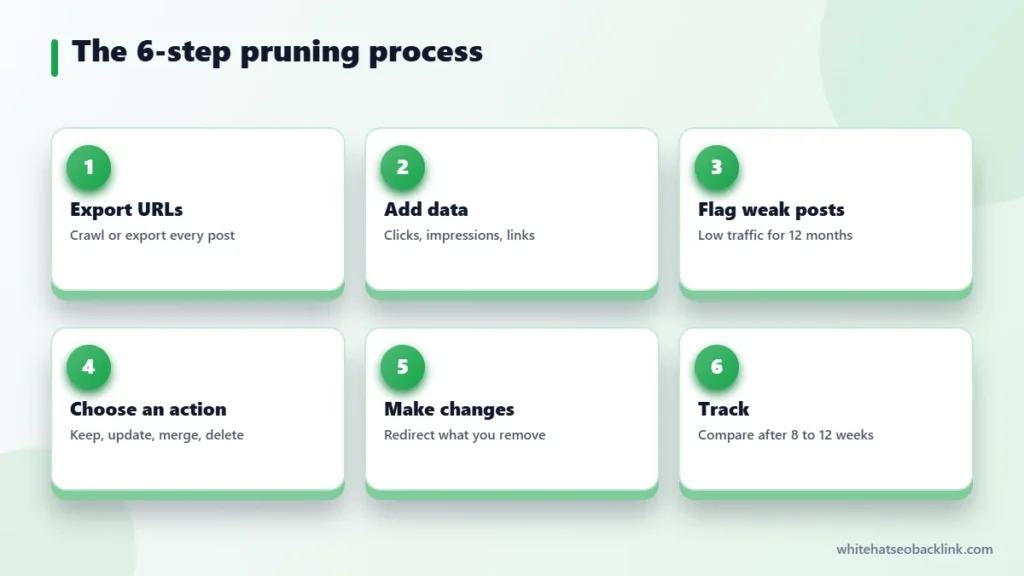
The content pruning process in 6 steps
Step 1: Export every URL
Use a crawler like Screaming Frog, or export your post list from WordPress. Include the URL, title, publish date and word count. Leave out pages like Contact or Privacy that you will always keep.
Step 2: Add performance data
Pull 12 months of data so seasonal posts are not judged unfairly. For each URL, add:
- Clicks and impressions from Google Search Console
- Sessions and conversions from Google Analytics
- Referring domains from Ahrefs, Semrush or a free backlink checker
- The main keyword the page targets
Step 3: Flag weak posts
This is where content pruning starts to take shape. Sort by clicks. Mark posts with very low clicks and impressions over the full year. Also mark posts that overlap with another post on the same topic. These flagged posts are your shortlist, not your delete list.
Step 4: Choose an action for each post
Use the decision table below. Be honest, but do not rush.
Step 5: Make the changes
Work in small batches of 10 to 20 posts. Update, merge or remove, then fix internal links and redirects before moving on.
Step 6: Track the results
Note the date of each batch. Compare clicks and impressions for the whole site and for the changed URLs after 8 to 12 weeks.
Keep, update, merge or delete: the decision table
| Situation | Best action |
|---|---|
| Good traffic and still accurate | Keep as is |
| Low traffic, but the topic has demand | Update and improve |
| Two or more posts on the same topic | Merge into one, redirect the others |
| No traffic, but has backlinks | Update, or redirect to a close match |
| No traffic, no links, no demand | Delete (410) or redirect |
| Needed for users, but not for search | Keep and set to noindex |

How to update a weak post
Updating is the most common outcome of content pruning, so it is worth doing well:
- Check what now ranks on page one for the main keyword and note what those pages cover that yours does not.
- Rewrite the introduction so it answers the question in the first few lines.
- Add missing sections, examples, images and an FAQ.
- Remove outdated facts, dead links and old screenshots.
- Add internal links from related posts. Our guide to SEO content writing has a simple process you can follow.
- Change the date only if you made real changes.
How to merge posts without losing rankings
Merging is the hidden power move of content pruning. Pick the strongest URL (most links and traffic), move the best parts of the weaker posts into it, then 301 redirect the weaker URLs to it. Update internal links so they point straight to the final URL, not through a redirect. If you want to repurpose content rather than merge it, see how to repurpose blog content.
How to remove content safely
When a post truly has no value, you have three choices:
- 301 redirect to the closest relevant page if one exists. This keeps any link value.
- 410 status if nothing related exists. It tells Google the page is gone on purpose.
- Noindex if users still need the page but it should not appear in search.
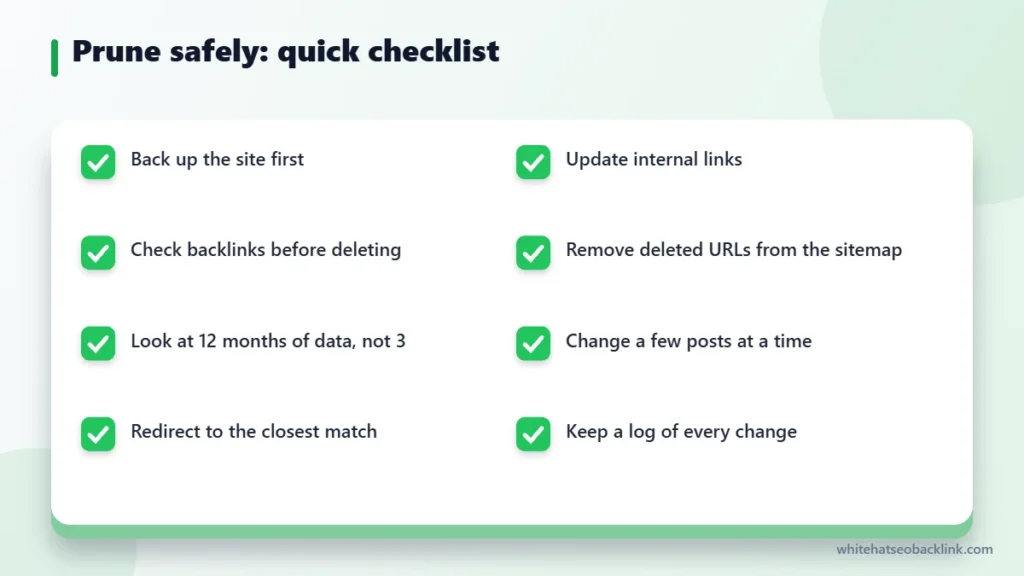
After removing posts, update your XML sitemap and fix internal links, or you will create orphan pages and broken links.
Content pruning mistakes to avoid
- Judging by traffic alone. A post with no clicks may have strong backlinks or help sales.
- Using too short a time window. Three months of data hides seasonal posts.
- Redirecting everything to the homepage. Google often treats this like a soft 404.
- Deleting in bulk. Change a few posts at a time so you can see what worked.
- Forgetting about conversions. Some low-traffic posts bring your best leads.
Free tools for content pruning
You do not need expensive software to run a good review. A simple setup works for most sites:
- Google Search Console for clicks, impressions and indexing status per URL.
- Google Analytics for engagement and conversions.
- Screaming Frog (free up to 500 URLs) to list every page, word count and internal links.
- A spreadsheet to bring the data together and record your decision for each post.
Add one column for “action” and one for “date changed”. That small habit turns content pruning into a repeatable system instead of a one-off clean-up.
How often should you prune content?
For most blogs, a full review once a year is enough, with a quick check every quarter for posts that have dropped sharply. Large sites with thousands of URLs may run content pruning as an ongoing process, a few dozen pages per month.
FAQs
Does deleting content improve SEO?
Sometimes, but not on its own. Removing truly useless pages can help, but updating and merging usually bring bigger gains. Delete only pages with no traffic, no links and no future value.
How long does it take to see results?
Most sites see changes within 4 to 12 weeks, depending on how often Google crawls them and how many pages changed.
Should I prune old news posts?
If they get no traffic and no links, yes. If they still get visits or links, keep them or redirect them to a relevant evergreen guide.
Is content pruning safe for small sites?
Yes, if you are careful. Small sites usually benefit more from updating and merging than from deleting, because every page with links matters.
Final thoughts
Content pruning is not about having fewer pages. It is about making sure every page earns its place. Start with data, choose the right action for each post, and work in small batches. Update first, merge second, and delete only when nothing else makes sense. Your strongest content will have room to grow.