Google Business Profile Posts: What to Post, How Often and 30 Easy Ideas
Your Google Business Profile is often the first thing customers see when they search for your business. Yet most small businesses set it up once and forget about it. That is a missed chance, because Google gives you a free way to show fresh news, offers and events right on your profile: Google Business Profile posts.
In this guide you will learn what to post, how often to post, how to write posts people actually click, and 30 easy post ideas you can use this month.
What Are Google Business Profile Posts?
Google Business Profile posts are short updates you publish from your profile. They can appear in Google Search and Google Maps when people view your business. Each post can include text, a photo or video and a button such as “Call now”, “Book” or “Learn more”.
You can add posts from the Google search results page (search your business name while logged in) or from the Google Business Profile manager.

The 3 Main Types of Posts
| Post type | Best for | Example |
|---|---|---|
| Update | News, tips, new photos, behind the scenes | “Our new winter menu is here” |
| Offer | Discounts and limited-time deals | “15% off first service this month” |
| Event | Workshops, sales, open days | “Free SEO workshop on Friday” |
Offer and event posts have start and end dates. Update posts are the most flexible, so they will make up most of your content.
Do Google Business Profile Posts Help Local SEO?
Google Business Profile posts are not a major ranking factor on their own. Their real power is conversion. A recent, helpful post shows people your business is active, answers questions before they call and gives them a reason to choose you over the listing next to you.
That said, an active profile is part of a strong local presence. Combine posts with reviews, accurate details and local links. Our guide on how to improve local SEO results covers the full picture, and getting more Google reviews is the natural next step.
How Often Should You Publish Google Business Profile Posts?
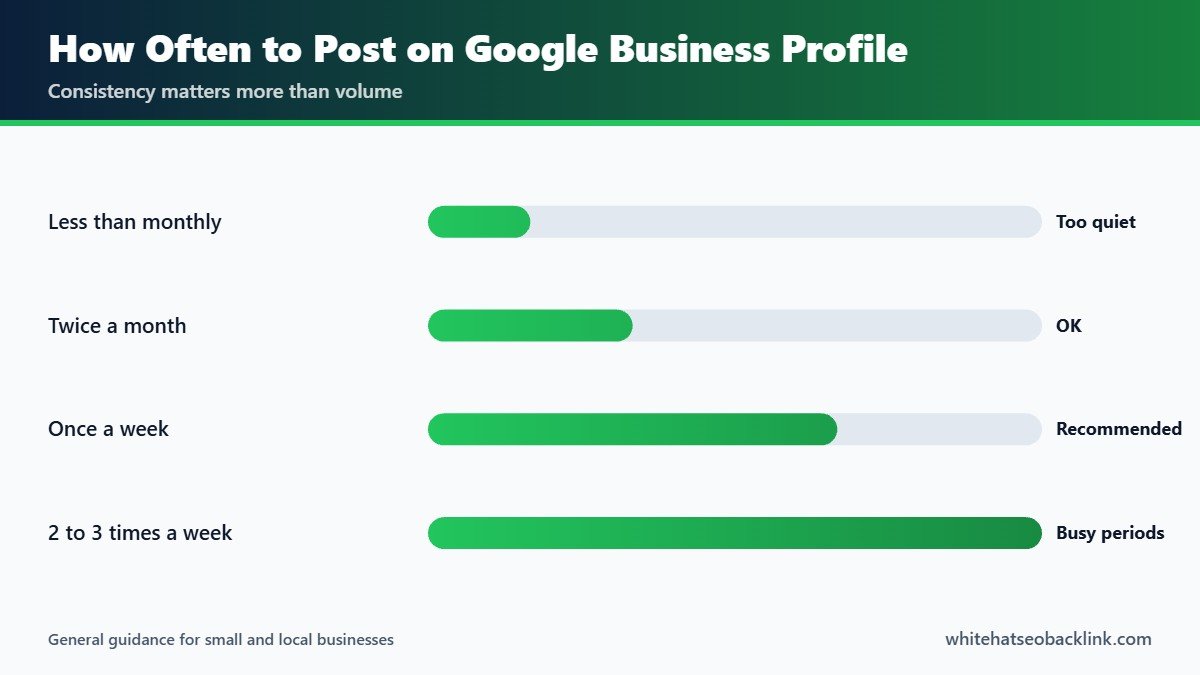
Aim for one post per week. That keeps your profile fresh without becoming a burden. If you run frequent offers or events, two to three posts a week is fine. Consistency matters more than volume, so pick a schedule you can keep.
Google Business Profile Posts Best Practices: How to Write Posts That Get Clicks
1. Lead With the Benefit
Only the first line or two show before people tap “more”. Put the most useful part first. “Same-day boiler repair across Leeds” beats “We are happy to announce…”.
2. Keep It Short
You can write up to 1,500 characters, but 150 to 300 words is usually too long. Two to four short sentences work best.
3. Use a Real, Bright Photo
Use your own photos of your team, products, work or premises. Stock photos look generic and get ignored. Keep important details in the center, because Google may crop the edges.
4. Add One Clear Button
Choose the button that matches the goal of the post: “Call now” for urgent services, “Book” for appointments, “Learn more” for blog posts or service pages.
5. Mention Your Service and Location Naturally
Write like a human. “Our Manchester team fitted 40 new kitchens this summer” sounds natural and still tells people what you do and where.
6. Track Clicks With UTM Links
Add UTM tags to the links in your posts, such as ?utm_source=google&utm_medium=gbp&utm_campaign=posts. Then you can see visits from posts in Google Analytics.

How to Create Posts on Google Business Profile (Step-by-Step)
- Step 1: Sign in to the Google account that manages your business and search for your business name on Google, or open Google Maps.
- Step 2: In your profile panel, click “Add update” (sometimes shown as “Promote” or “Add post”).
- Step 3: Choose the post type: update, offer or event.
- Step 4: Add a photo or video, write your text and pick a button.
- Step 5: Preview the post on mobile, then publish.
Google Business Profile posts usually go live within minutes, but some are held for review. If a post does not appear after a day, check it against Google’s posts guidelines and try again. Many businesses also use Google posts to share blog content, which keeps both your profile and your website fresh.
Google Business Profile Posts Examples: 30 Easy Ideas
Updates
- Introduce a team member with a photo
- Share a before-and-after project
- Answer a common customer question
- Show a new product or service
- Share a quick tip related to your industry
- Announce new opening hours or holiday hours
- Celebrate a business milestone
- Show behind the scenes of your work
- Share a recent 5-star review (with a thank you)
- Link to your newest blog post
Offers
- First-time customer discount
- Seasonal promotion
- Bundle deal
- Referral reward
- Free consultation or audit
- Loyalty reward for repeat customers
- Limited-time free add-on
- Weekday or off-peak discount
- Student, senior or local resident deal
- Early-bird booking offer
Events
- Workshop or training session
- Open day or store launch
- Webinar or live Q&A
- Community or charity event you are joining
- Product demo day
- Holiday sale
- Local meet-up you are hosting
- Anniversary celebration
- Free check-up day
- Customer appreciation event
Running out of ideas? Turn each blog post into a Google post. Our guide on how to repurpose blog content shows how to stretch one idea across many channels.

A Simple Monthly Posting Plan
| Week | Post type | Idea |
|---|---|---|
| Week 1 | Update | Tip or answer to a common question |
| Week 2 | Update | Project photo or team spotlight |
| Week 3 | Offer | Seasonal or first-time customer deal |
| Week 4 | Update or Event | Review highlight, blog post or upcoming event |
Google Business Profile Posts Mistakes to Avoid
- Posting the same text again and again
- Using phone numbers in the post text (Google may reject posts with phone numbers in the body. Use the “Call now” button instead)
- Stuffing keywords into every sentence
- Using blurry or heavily edited stock images
- Sharing offers that have already ended
- Posting for two weeks and then stopping for six months
Also make sure your Google Business Profile posts follow Google’s content policies for posts, or they may be removed.
Frequently Asked Questions
How long do Google Business Profile posts stay live?
Offer and event posts end on the date you set. Update posts stay on your profile, but newer posts push older ones down, so regular posting keeps your best content visible.
Why was my Google post rejected?
Common reasons include phone numbers in the text, low-quality images, misleading offers or content that breaks Google’s policies. Edit the post and try again.
Can I schedule Google Business Profile posts?
Google does not offer native scheduling for all users, but many social media and local SEO tools let you schedule posts in advance.
Final Thoughts
Google Business Profile posts are free, quick and seen by people who are ready to buy. Post once a week, lead with the benefit, use real photos and add a clear button. Small effort, steady results.
Want more local customers from Google? Explore our off-page SEO checklist or talk to our team about local SEO and link building.